The Two-Second Test
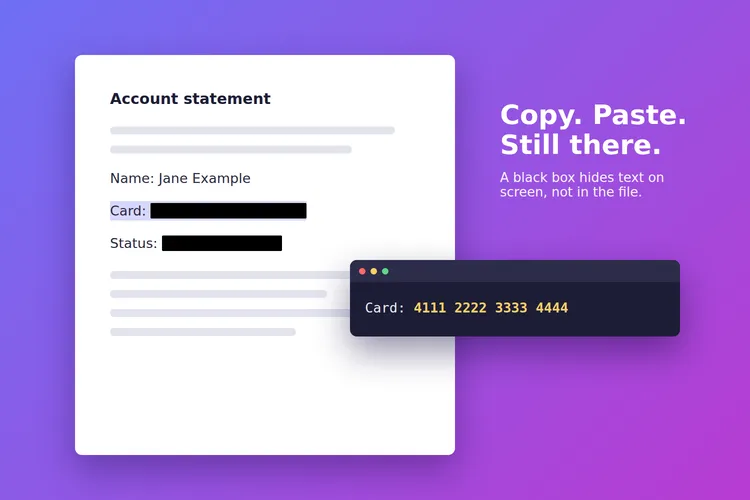
Open a PDF that someone has "redacted". Put the cursor just before one of the black boxes, drag across it, copy, and paste into a plain text editor.
If words appear, the document was never redacted. Someone painted over it.
That test has embarrassed government agencies, law firms and courts for twenty years, and it still works on documents published this year. The reason is not carelessness alone. It is how a PDF page is built, and once you see that, the failure stops looking mysterious.
A PDF Page Is a List of Drawing Instructions
A PDF page is not a picture. It is a sequence of instructions: set this font, move here, write these characters, draw this line, fill this rectangle. A viewer runs them in order, and whatever is drawn later lands on top of whatever was drawn earlier.
When you draw a black rectangle over a line of text in an ordinary PDF editor, you add one more instruction at the end: fill a rectangle here, in black. The instruction that writes the text is still there, unchanged. On screen the rectangle hides it. To anything that reads the file instead of looking at it — copy and paste, search, a screen reader, a search engine, a one-line script — the text is exactly where it was.
We built a small test file to show it: three lines of text, with a black box drawn over an account number. This is what pdftotext, a standard command-line tool, prints for it:
Patient: Jane Example
Account number: 4111 2222 3333 4444
Diagnosis: confidential
The box is solid black in every viewer. The number is still in the file. Then we ran the same file through a real redaction and asked again:
Patient: Jane Example
Account number:
Diagnosis: confidential
Same box on the page. This time the characters underneath are gone from the file, and there is nothing left to copy.
It Keeps Happening
Three cases, years apart, with the same cause:
- December 2009, the TSA screening manual. A version of the US Transportation Security Administration's airport screening procedures was posted on a federal contracting website with its sensitive passages blacked out. The black boxes were overlays; copying the text into another program revealed what was underneath. Five employees were put on administrative leave and Congress held a hearing on the breach (IEEE Spectrum).
- January 2019, a court filing by Paul Manafort's lawyers. Reporters found that the blacked-out passages could be copied and pasted, and the hidden text became the story. The filing was later resubmitted with working redactions. The American Bar Association's Judges' Journal used it as a case study in why the copy-and-paste check matters (ABA).
- Winter 2025–26, the US Justice Department's Epstein file releases. Within days of the first batch, readers showed that text under black boxes in some of the PDFs could be selected and pasted out. In a later review the Associated Press found that some text redactions could be "overridden by simply double clicking on them to reveal the hidden text underneath" (PBS NewsHour / AP).
None of these teams lacked resources. They used a tool that draws boxes when the job needed a tool that removes content, and the two look identical on screen.
Other Places Text Hides in a PDF
The text under the box is the famous failure. It is not the only one.
- Scanned documents with OCR. A scan made searchable carries an invisible text layer behind the image (we explained how in our post on OCR). Paint over the picture of a name and the invisible copy of that name can still be underneath.
- Form fields and comments. Values typed into a form field and the text of comments are stored apart from the page content. A redaction that only looks at the page does not see them.
- Document properties. Author, title, subject and the software that made the file sit in the PDF's metadata. A title like "Settlement – J. Smith v. Acme" outlives every black box in the body.
- Bookmarks and attachments. The bookmark panel has its own text, and a PDF can carry whole files inside it. Neither is on any page.
- Earlier versions of the same file. Many editors save changes by appending them to the end of the file, leaving the previous version inside. Tools that read the file directly can sometimes recover what was there before the "redaction" was saved.
- Blur and pixelation. Blurring a screenshot of text is not removal either. Short, predictable content — numbers, names from a known list — can sometimes be reconstructed from the blur. Use solid boxes.
What Real Redaction Does
Real redaction changes the file, not just its appearance. For every marked area it:
- finds the text whose characters fall inside the area and deletes those characters from the page's instructions;
- erases the pixels of any image that lies under the area, so a scanned page is changed too;
- only then paints the black box, as a marker of where something was removed;
- writes the result as a new file, so the earlier versions do not travel along.
That is what our Redact PDF tool does, using the MuPDF engine. You can drag across areas on a page preview, or type a name or number and have every occurrence on every page blacked out at once. A checkbox, on by default, also removes the document properties.
It has limits, and they are worth knowing before you rely on it:
- Word search needs real text. A plain scan is a picture, so mark its areas by hand, or run OCR first if you want to search it.
- Form fields and comments are not page content. Flatten the PDF first so they become part of the page, then redact.
- Bookmarks and embedded attachments are left as they are. If they could contain anything sensitive, check them, or remove the pages and rebuild the document.
Check Before You Send
Whatever tool you use, check the result yourself before it leaves your hands:
- Drag across each black box, copy and paste into a plain text editor. Nothing should appear.
- Search the document for the names and numbers you removed. There should be no matches.
- Open the document properties and read every field.
- Open the bookmarks and attachments panels.
- Keep the original somewhere safe. Redaction cannot be undone, which is the whole point.
Two seconds of copy and paste is cheaper than a hearing.